Run A Farm guide
Run A Farm Codes: RELEASE and How to Redeem
Find the developer-advertised RELEASE cash code for Run A Farm and use the verified Settings code box. Redemption has not been independently tested.
Quick answer
RELEASE is advertised for free cash in the official Roblox description checked November 5, 2026. Open Settings and use the Codes row.
Claim an advertised code
Follow the current interface and read purchase prerequisites.
Developer-advertised code
RELEASE is the one code listed in the current official game description. The developer describes the reward as free cash.
- Success check
- The entered string matches RELEASE in the official description.
- If it remains unclear
- Secondary lists report 500 Cash. The official description does not specify an amount, and this site has not performed a live redemption, so the reward is listed as free cash.
Redeem through Settings
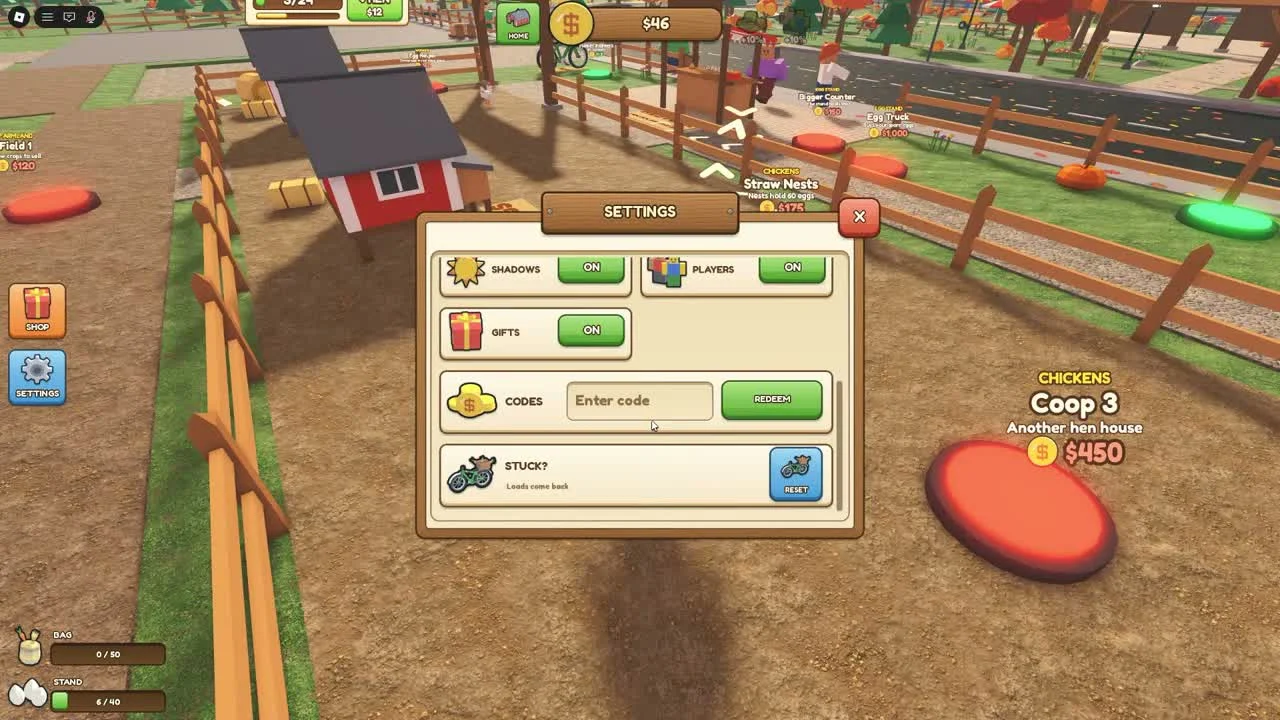
Press the blue Settings gear on the left of the screen. The reviewed Settings window contains a Codes row with an Enter code field and a green Redeem button.
- Success check
- The game returns a redemption response that you can read alongside the cash balance.
- If it remains unclear
- Enter RELEASE exactly, then press Redeem and read the result. Check your cash balance and the displayed response before trying again. The illustration shows the interface, not a successful redemption by this site.
If the code is rejected
Confirm the game is Run A Farm! by Farm CStudios, Place 79496881832552. Remove extra spaces and preserve the advertised capital letters.
- Success check
- You have checked the correct game and retained the exact rejection message.
- If it remains unclear
- Keep the actual response: already used, invalid and expired describe different outcomes. Check the current official description if the advertised code is rejected; do not assume another farming game uses the same codes.
Check the right developer for updates
Use the Roblox game page and its Farm CStudios creator link for current announcements. The search results contain another Run A Farm by a different creator.
- Success check
- The announcement belongs to Farm CStudios and this exact Roblox experience.
- If it remains unclear
- No expired-code list or release schedule is asserted without evidence. A listed developer code is separate from a code tested successfully in the current game.
Scope and sources
Official description and reviewed gameplay checked November 5, 2026.
- For Run A Farm! by Farm CStudios. Recorded prices and interface details may change; read your current purchase prompt.